
Microlearning: What It Is, Why It Works, and How to Use It
Microlearning is a training approach that delivers content in short, focused lessons, each built around one learning objective and designed to be completed in just a few minutes. Microlearning modules can be short videos, quick quizzes, interactive scenarios, job aids, or flashcards, and learners usually take them on a phone or laptop at their own pace.
For busy teams, microlearning offers a practical way to teach employees and support skill development without pulling people away from work for long sessions. This guide explains what microlearning is, why microlearning works, the main microlearning format options with a few examples, the microlearning benefits and limitations, and how to implement microlearning in an existing training program.

What Is Microlearning?
Microlearning breaks training into bite sized chunks, with microlearning modules that each cover one skill, concept, or task. Instead of a two hour course on customer service, microlearning courses might include ten short modules: one on greeting customers, one on handling a complaint, one on processing a return, and so on.
Most definitions share a few key characteristics:
- Short: Each lesson takes a few minutes. There is no fixed rule, but the goal is a short period that fits into a workday.
- Focused: Each microlearning module targets one learning objective. If a lesson tries to teach three things, it should be three lessons.
- Self paced: Learners can take lessons when and where they need them, often on mobile apps or a learning platform.
- Actionable: Lessons focus on what the learner needs to do, not everything there is to know about a topic.
Microlearning is not the same as cutting a long course into pieces. Good microlearning content is designed from the start around small, complete units that make sense on their own.
Why Microlearning Works
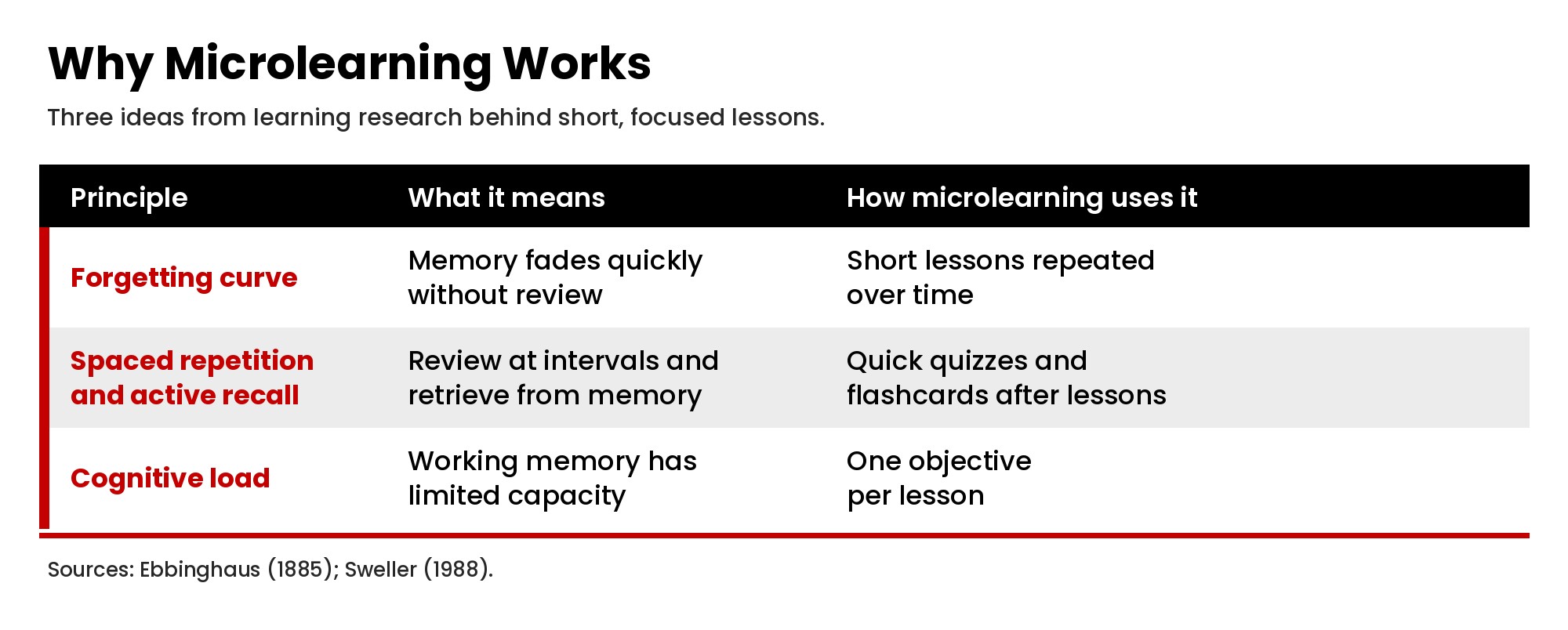
Microlearning helps because it aligns with how users learn and remember relevant information. Three ideas from cognitive psychology explain much of its value.
The forgetting curve
In the 1880s, the psychologist Hermann Ebbinghaus studied how quickly people forget new information. His work, known as the forgetting curve, showed that memory drops quickly after learning unless the information is reviewed. Short microlearning sessions repeated over time help learners retain information instead of forgetting most of a single long session.
Spaced repetition and active recall
Spaced repetition means reviewing material at increasing intervals. Active recall means retrieving information from memory, for example by answering a question, rather than rereading it. Microlearning makes both easy, which is one reason microlearning helps people retain information: a short quiz or flashcard set can be sent days or weeks after the first lesson to improve retention.
Reducing cognitive load
Cognitive load theory, developed by John Sweller, describes the limited capacity of working memory and how much new knowledge a learner can process at once. Long lessons packed with new information can overload working memory, so short videos and focused lessons work better for new material. Microlearning focuses on one idea at a time, which keeps the load manageable and makes complex topics easier to absorb in small chunks.
Microlearning Examples and Formats
Microlearning can take many forms, and the microlearning examples below show how learners use bite sized lessons in practice. The right format depends on the skill and the intended goal.
- Microlearning videos: Short videos are the most familiar microlearning format. Microlearning videos demonstrate a task, explain a concept, or tell a quick story. Screen recordings, talking head videos, and whiteboard animations are common.
- Short quizzes and knowledge checks: Quick quizzes after a lesson, or on their own, give learners practice with active recall and give trainers data on knowledge gaps.
- Interactive scenarios: Branching questions that ask learners to make a decision, such as how to respond to an upset customer.
- Job aids and checklists: One page references or quick tutorial cards learners use on the job.
- Flashcards: Bite sized pieces of knowledge for terms, product details, or steps.
- Infographics: Microlearning infographics are visual summaries of key points and key takeaways.
- Podcasts and audio: Short audio lessons for people who learn while commuting or traveling.
Microlearning use cases
Microlearning is especially useful for:
- Onboarding: Breaking company policies, benefits, tools, and procedures into short lessons new hires can complete in their first weeks. Our guide to building an employee onboarding program shows how microlearning fits into the first 90 days.
- Compliance training and safety training: Short refreshers that keep critical information current between full courses.
- Sales and product training: Quick updates on new products, pricing changes, or objection handling. See our guide to sales enablement training.
- Frontline and hospitality teams: Mobile learning for employees who are rarely at a desk. Our article on designing microlearning for hotel guest service teams shows one industry example.
- Performance support: Lessons learners can find in the moment they need them.
Benefits of Microlearning
The benefits of microlearning come from its size and flexibility.
- Fits busy schedules. Learners can complete a lesson between tasks instead of blocking off longer sessions.
- Supports knowledge retention. Short lessons combined with spaced repetition and quick quizzes help learners remember and apply knowledge.
- Supports learner engagement. Focused lessons with a clear payoff can help engage learners who lose interest in long courses, and in schools the same approach is used to support student engagement.
- Faster to update. When a process changes, you update one short module instead of rebuilding a full course.
- Easy access. Learners gain access to lessons on microlearning apps, mobile apps, or a learning platform, wherever they are.
- Targets skill gaps. Trainers can assign specific modules to close specific skill gaps rather than sending everyone through the same course.
- Useful data. Completion rates and quiz results for each short module show where learners struggle.
Limitations of Microlearning
Microlearning is a powerful tool, but it is not right for everything.
- Some skills need more time. Leadership, complex software, or advanced technical abilities often need longer sessions, practice, and coaching. Microlearning can support these programs but rarely replaces them.
- Fragmentation. Too many disconnected lessons can leave learners without the big picture. Structure modules into a clear path.
- Not a shortcut for poor design. Short content still needs clear objectives, good examples, and practice.
- Social learning is harder. Discussion and collaboration usually happen in live sessions or cohorts, not in a two minute module.
Many organizations combine microlearning content delivery with traditional training in a blended approach. Our guide to blended learning for workplace training explains how to mix formats.
How to Implement Microlearning
Here is how to create microlearning courses that work.
- Start with objectives. Write one measurable objective per module. Our guide to writing learning objectives explains how.
- Identify the right content. Focus on the skills and knowledge learners need most, especially critical skills and common mistakes.
- Break existing courses into focused lessons. Review existing courses and split them into short lessons that each stand on their own.
- Choose the format. Match the format to the goal: a video to demonstrate, a quiz to check, a scenario to practice.
- Keep each lesson tight. Cut anything that does not serve the objective. Use plain language and one key message.
- Plan reinforcement. Schedule short quizzes or refreshers after the first lesson so knowledge is reviewed over time.
- Deliver where learners are. Use a learning management system or microlearning apps that work on mobile devices.
- Measure and improve. Track completion rates, quiz results, data findings from surveys, and on the job performance, then update the different modules that underperform.
Microlearning vs. Traditional Learning
| Factor | Microlearning | Traditional learning |
|---|---|---|
| Lesson length | A few minutes | Longer sessions, often an hour or more |
| Focus | One objective per lesson | Several objectives per session |
| Pace | Self paced, on demand | Often scheduled |
| Best for | Specific skills, refreshers, performance support | Complex skills, deep practice, discussion |
| Updating | Update one module | Often rebuild a full course |
Frequently Asked Questions
Does microlearning really work?
Microlearning works best for focused skills and knowledge, especially when lessons are reinforced over time. It is less effective on its own for advanced abilities that need extended practice.
How long should a microlearning lesson be?
There is no single standard. Most microlearning lessons take just a few minutes. The better test is whether the lesson covers one objective completely.
What are the disadvantages of microlearning?
It can fragment learning if lessons are not organized into a path, and it is not a full replacement for longer training on complex topics.
What is the best microlearning platform?
The best of the microlearning apps and platforms is the one your learners already use and can access on their devices. Many learning management systems support microlearning content and mobile delivery.
Build Training That Fits the Workday
Microlearning delivers short videos, quizzes, and focused lessons that fit busy schedules, support knowledge retention, and are easy to update. Use bite sized microlearning modules for onboarding, compliance training, company policies, product updates, and performance support, and pair it with longer formats for complex skills. If you want help turning your training content into a library of microlearning modules, contact Course Crafters to talk about your project.
Sources: Ebbinghaus, H. (1885), Memory: A Contribution to Experimental Psychology; Sweller, J. (1988), Cognitive Load During Problem Solving: Effects on Learning, Cognitive Science.