LMS Migration Services for Businesses
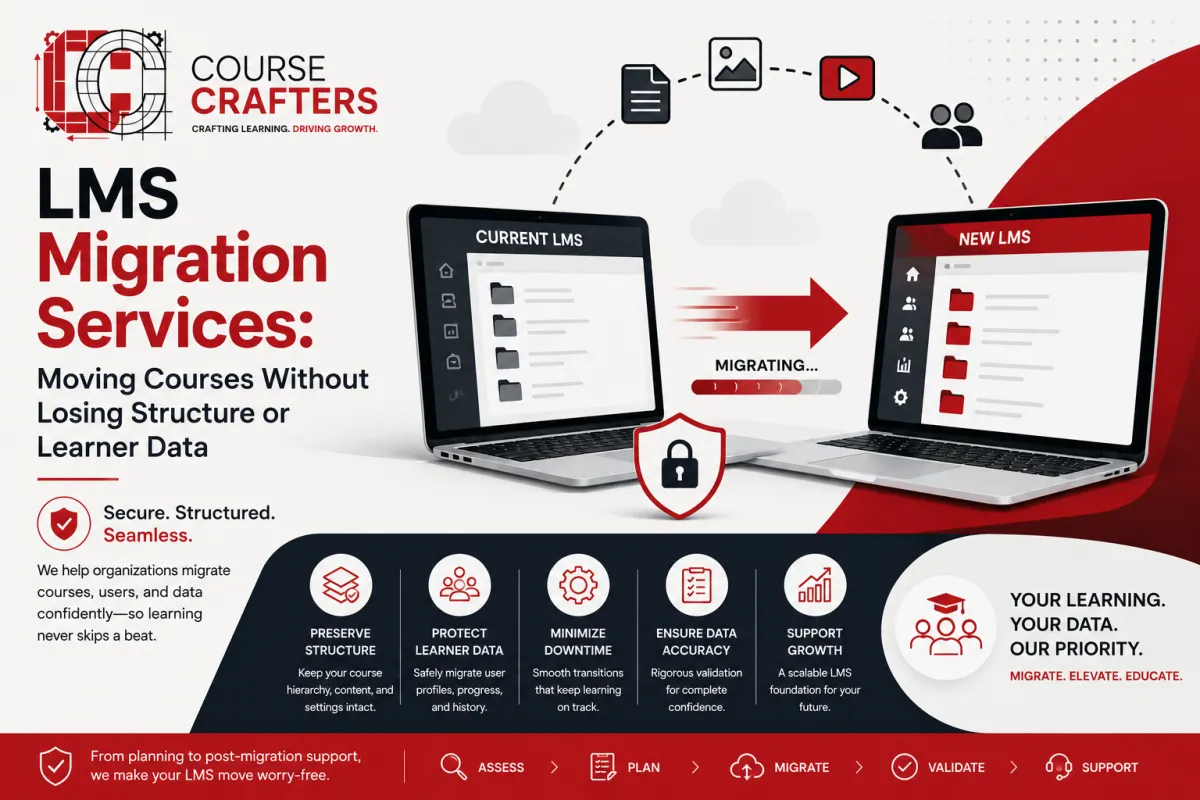
LMS Migration Services: Moving Courses Without Losing Structure or Learner Data
LMS migration services help organizations move from one learning management system to a new lms platform without losing course structure, user records, or reporting continuity. This article is for organizations replacing an existing lms or consolidating multiple platforms and course libraries - not for first-time implementations.

Before diving in, here are the key concepts this article covers:
Learning management system migration - the end-to-end process of moving from one lms to another
Course migration services - transferring course structures, content packages, and pedagogical pathways
Content transfer - moving SCORM packages, videos, documents, and assessments between platforms
User migration - porting user profiles, enrollments, completions, certifications, and historical learning data
LMS migration involves transferring courses, user data, and configurations. Professional lms migration services help organizations modernize their learning ecosystems while data migration involves transferring user data, course content, and learning history. Poorly planned lms data migration can result in lost compliance history, broken learning paths, and reporting gaps that affect audits and executive dashboards.
This article outlines when to consider switching to a new learning management system, how the lms migration process typically works, what to ask lms vendors, and how professional migration services de-risk the project. Timelines for 2024–2026 enterprise migrations usually range from 6–12 weeks for simple moves to 4–6 months for global, highly integrated environments.
Near the end, you will find a practical next step: request an LMS migration assessment.
Why Organizations Switch LMS: Triggers for Migration
Picture a company running a legacy lms deployed before 2015. The interface feels dated, mobile learning barely works, integration with HRIS or customer relationship management tools is limited, and pulling a compliance report requires three spreadsheets and a prayer. Companies migrate due to outdated LMS technology and poor user experience, and the costs of maintaining that old system keep climbing.
Companies face increasing operational costs with outdated lms systems, and limited reporting capabilities often drive organizations to migrate LMS. Organizations often migrate to improve user experience, reporting, and compliance features - and the results can be dramatic. Definity Financial Corporation saw a 64% increase in LMS usage after switching to a user-friendly system.
Common triggers for learning management system migration include:
Rising costs - escalating license fees, maintenance contracts, and custom development on an outdated lms
Poor UX - clunky interfaces that frustrate learners and suppress completion rates
Weak analytics - inability to track skill development, compliance gaps, or training ROI in real time
Integration gaps - no clean connection to HRIS, SSO, or CRM platforms
Regulatory pressure - tightened expectations around SOC 2, GDPR, HIPAA, and ISO 27001 since ~2020 making many older lms platforms non-viable
Business events - post-merger consolidation, cloud migration, rapid workforce growth, or shifting from classroom to blended and digital learning
These triggers are strategic, not just technical. They affect onboarding quality, partner enablement, compliance risk, and leadership's ability to see skills gaps across the organization.
From Legacy LMS to Modern Platform: Pain Points and Opportunities
A legacy lms - often customized, on-premises, or built before 2015 - typically traps valuable lms data in proprietary schemas. Answering simple questions like "Who hasn't completed mandatory training in the last 12 months?" becomes a multi-step ordeal.

Key lms pain points with an existing system include:
Manual user imports with no HRIS sync
Limited or no SSO support
Clunky course catalogs with no mobile app
Rigid reporting layouts requiring Excel workarounds
No support for modern learning approaches like microlearning or social learning
The opportunity side is equally significant. LMS transition is a chance to retire obsolete courses, unify multiple content libraries, align structures with current job roles, and support new formats including ILT+VILT blends and mobile learning.
Real outcomes back this up. La-Z-Boy achieved an 85% increase in course completion rates after migrating to a modern learning platform. Nord Anglia experienced a 27-point increase in their net promoter score following their own lms transition.
Between 2022 and 2026, many enterprises have used lms transitions to standardize global compliance curricula and multilingual learning paths across EMEA, North America, and APAC. The migration process must be aligned with the organization's long-term goals and growth potential - view it as part of broader learning ecosystem modernization, not just a technical cut-over.
Scoping Your LMS Migration Project: Data, Content, and Integrations
Every migration project starts by defining migration scope: which data, which content, which audiences, and which integrations. LMS migrations often require defining project goals and risk assessments during planning - and data mapping is essential for successful lms data migration.
LMS data categories to consider:
User profiles (name, job title, manager, region, custom fields)
Organizational hierarchies and user groups
Enrollments, completion history, and evaluation results
Certifications, licenses, and CPD credits
Employee data and custom metadata (cost center, job family)
Content scope:
SCORM 1.2/2004 packages and xAPI or cmi5 content
Video libraries (hosted vs. linked), PDFs, question banks
Learning paths, ILT/VILT sessions, equivalencies, and recertification rules
Content that needs to be migrated vs. rebuilt vs. retired
Integration landscape to document:
HRIS/HCM (Workday, SAP SuccessFactors, Oracle HCM)
CRM (Salesforce, Microsoft Dynamics)
SSO/identity providers (Azure AD, Okta)
Web conferencing (Zoom, MS Teams, Webex)
External content marketplaces and learning record stores
Create a migration inventory spreadsheet listing each data object type, its source in the current lms system, target structure in the new lms, and whether it is "migrate," "rebuild," or "retire." Clear scoping decisions made in weeks 1–3 of the lms migration project are the single biggest predictor of staying on timeline and budget.
Key Stakeholders and Roles in an LMS Migration
Successful lms migration services always involve a defined lms migration team - not just L&D and IT working in their spare time. Successful migration requires careful planning to maintain compliance and training outcomes, and that starts with the right people.
Core roles and what they own:
Executive sponsor - sets budget, defines strategic objectives and success criteria
L&D leader - owns learning strategy, content decisions, and training programs
HRIS/IT lead - manages integrations, SSO, data security, and tech stack alignment
LMS administrators - handle configuration, testing, and day-to-day platform management
Vendor migration specialists - lead technical conversion, content validation, and data imports
Development team - supports custom integrations, application programming interfaces, and scripts
In heavily regulated sectors like finance, healthcare, and aviation, involve compliance officers, information security teams, and data protection officers early. Regional learning partners or business unit L&D leads are critical for validating user migration, localized content transfer, and reporting structures.
Set up a clear RACI matrix for all migration phases so decisions like "how far back to migrate history" and "what to do with legacy certifications" do not stall the project. Key stakeholders should meet weekly during planning and testing, moving to daily check-ins during cut-over weeks.
The LMS Migration Process: Four Phases from Assessment to Stabilization
The lms migration process follows four phases: discovery, preparation, migration execution, and post-go-live stabilization. A successful LMS migration can take 3 to 6 months for large organizations, so plan accordingly.

Phase 1 - Discovery (2–4 weeks):
Assess the current lms, inventory content and existing lms data
Map integrations, identify risks, and build a high-level lms migration project plan
Backup current data to avoid loss during the migration process
Phase 2 - Preparation (3–6 weeks):
Complete data mapping between the existing system and the new learning management system
Clean up content, configure the new system, build SSO and HRIS connections
Draft test plans, define user groups and role hierarchies
Phase 3 - Migration Execution (2–6 weeks):
Run a pilot migration with a small group - testing should be conducted on a small group before full migration
Testing phases can include pilot migrations and user acceptance testing to identify issues pre-launch
Execute bulk content transfer, user migration, learning history import, and delta migration
A phased migration approach minimizes risks of data loss and errors
Phase 4 - Post-Go-Live Stabilization (4–8 weeks):
Monitor performance, validate reports, and provide post migration support
Ramp up administrator and learner support, fine-tune dashboards
Decommission the old lms
One university case study documented a 9-month on-premises-to-cloud rollout covering 1,200 courses and 18,000 user accounts, resulting in 99.99% uptime and a 35% reduction in instructor admin hours.
Big-bang vs. phased rollout: Big-bang works when you have a uniform learning environment, fewer integrations, and thorough testing. Phased rollouts - by region, business unit, or audience - are safer for large-scale, multi-language implementations with complex compliance requirements.
Data Migration: Protecting Learning History and Reporting Continuity
Data migration is crucial to avoid data loss during LMS transition and is the most critical part of the LMS implementation process. Data migration can lead to data loss or corruption if not handled carefully - and for compliance-heavy organizations, this risk is existential.
Understand the three categories of existing data:
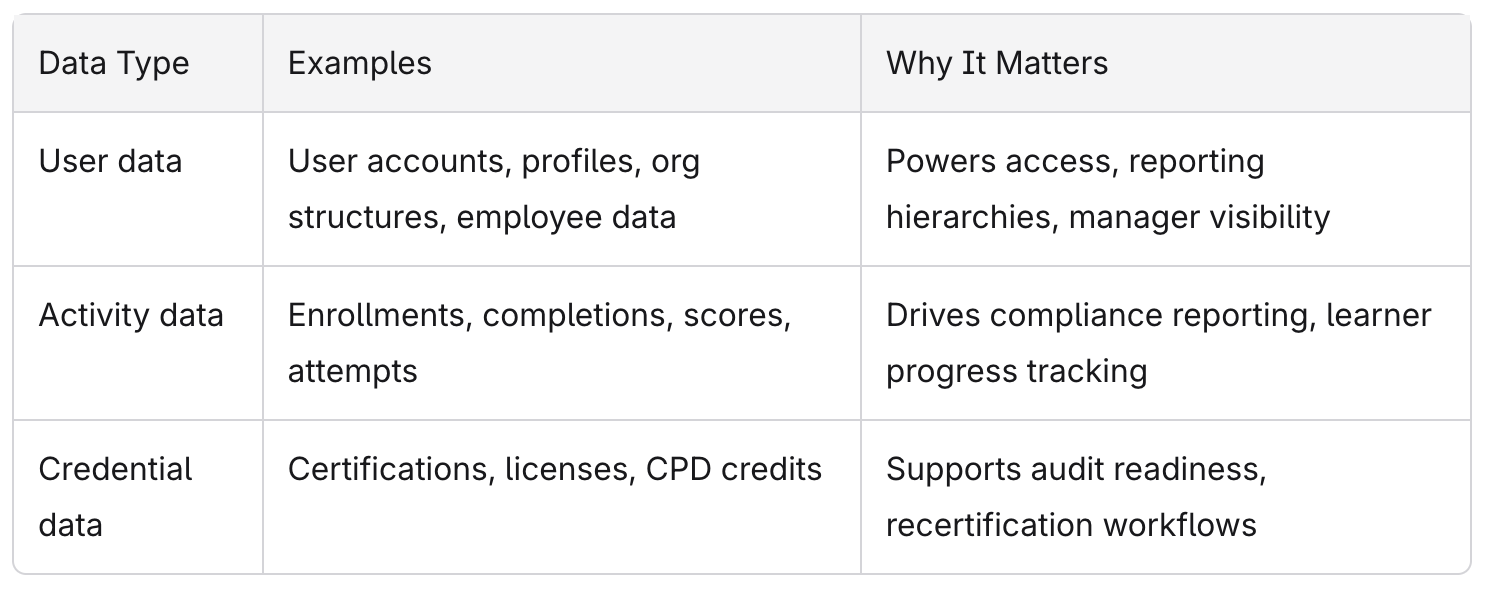
Extraction from the current lms: Exports via CSV, SQL, or vendor-provided APIs, plus file exports for SCORM/xAPI packages and media assets.
Data mapping work: Align legacy fields to the new lms schema, decide on new required fields, and handle mismatches - for example, mapping old "business unit" to a new "division + department" structure.
Quality controls:
Cleanse data to remove duplicate or inactive user accounts
Normalize date formats and IDs
Testing and validating migrated data ensures integrity in the new lms
Use a "cut-off date" and "delta migration" strategy to capture training record changes between initial export and final go-live. A typical read-only window for the old system runs 3–7 days during cut-over.
In pharmaceuticals, aviation, and financial services, organizations often retain 3–7 years of historical completion data to support audits. Co-op Solutions saved over 75 hours of reporting time after migration - a direct result of clean data migration and improved reporting continuity in the new platform.
Course Migration Services and Content Transfer Considerations
Course migration services include both moving files and re-creating course structures so learners see familiar pathways and prerequisites in the new lms. This goes well beyond drag-and-drop file transfers.
Content types requiring special handling:
SCORM 1.2/2004 and xAPI/cmi5 - usually support automated content transfer
Proprietary assessments and quiz engines - often require re-authoring in tools like Articulate Storyline, Rise, or Adobe Captivate
Legacy Flash-based content - must be rebuilt entirely
ILT/VILT sessions - need calendar and scheduling reconfiguration
Video libraries - may need re-hosting or URL remapping
Automated content transfer can help avoid rebuilding curriculums from scratch during migrations. However, preserving course relationships - curriculums, learning paths, equivalents, recertification rules, and completion requirements - demands careful mapping.
Before migration, audit your library. Organizations often find 20–40% of their course catalog is outdated or duplicate. Retiring these early reduces both the migration project effort and ongoing maintenance. Per-course conversion rates from specialist firms range from roughly $80–$150 per course depending on volume, while manual rebuilds can run $400–$2,000 each.
Many organizations use lms migration as the moment to standardize course naming conventions, tagging by role or regulatory code, and multilingual learning initiatives.
Integration and Security: Connecting the New LMS Safely
A modern lms platform rarely stands alone. It must integrate cleanly into your HR, identity, and collaboration tech stack, and it must do so securely.

Integrations to rebuild during migration:
HRIS user sync for auto-population and auto-enrollment
SSO via SAML/OIDC with identity providers like Azure AD or Okta
CRM learning assignments (Salesforce, Microsoft Dynamics)
Web conferencing tools (Zoom, MS Teams, Webex)
External content marketplaces and learning record stores
Application programming interfaces for custom data flows that exchange data between systems
LMS migration services include reviewing API endpoints, event triggers, and data flows so automations like "new hire auto-enrolled to onboarding path" work on day one of the new system. Integration failures can disrupt user access post-migration, making thorough testing essential.
Security and compliance requirements:
Data security is critical during migrations to comply with regulations like GDPR or CCPA
Security protocols should enforce encryption and controlled access during data transfers - TLS 1.2+ in transit, AES-256 at rest
Role-based access controls, audit-grade logging, and data residency requirements (EU vs. US hosting)
Many organizations now require vendors to hold SOC 2 Type II and ISO 27001 certifications before any production data migration begins
Run integration and SSO tests in a staging environment at least 2–4 weeks before go-live. This single step prevents a disproportionate share of launch-day failures.
Common Risks in LMS Transitions and How Services Mitigate Them
LMS migrations fail when migration scope, data quality, and change management are underestimated. Professional migration services prevent data loss and minimize downtime during transitions - but only if the right safeguards are in place.
Data and reporting risks:
Missing compliance completions (e.g., records from 2020–2023 lost during transfer)
Mis-mapped user roles leaving managers without visibility of their teams
Broken reports and dashboards showing gaps in learner progress
Inadequate planning can result in extended downtime during migration
Project risks:
Unrealistic timelines - trying to successfully migrate a 10-year-old lms with 500+ courses in 4 weeks
Lack of executive sponsorship or unclear ownership between internal teams and the new lms vendor
Scope creep when technical aspects of content re-authoring are discovered mid-project
How experienced partners mitigate these:
Structured lms migration project plan with formal sign-off checkpoints after data mapping, pilot migration, and final cut-over
Pilot migrations with 5–10% of the user base to catch issues early
Automated validation scripts comparing old vs. new system reports
Dual-run periods where both lms systems operate in parallel for read-only comparison
Clear rollback options if critical issues surface
Change management risks:
User resistance can lead to low engagement after migration
Migration should include comprehensive training for administrators and users after the launch - stakeholder training, quick-reference guides, and short orientation sessions before launch improve adoption and minimize downtime
Timelines, Costs, and Success Metrics for LMS Migration Services
Actual timelines and budgets depend on data volume, content complexity, and integration count. Here are realistic ranges to guide planning.
Timeline brackets:
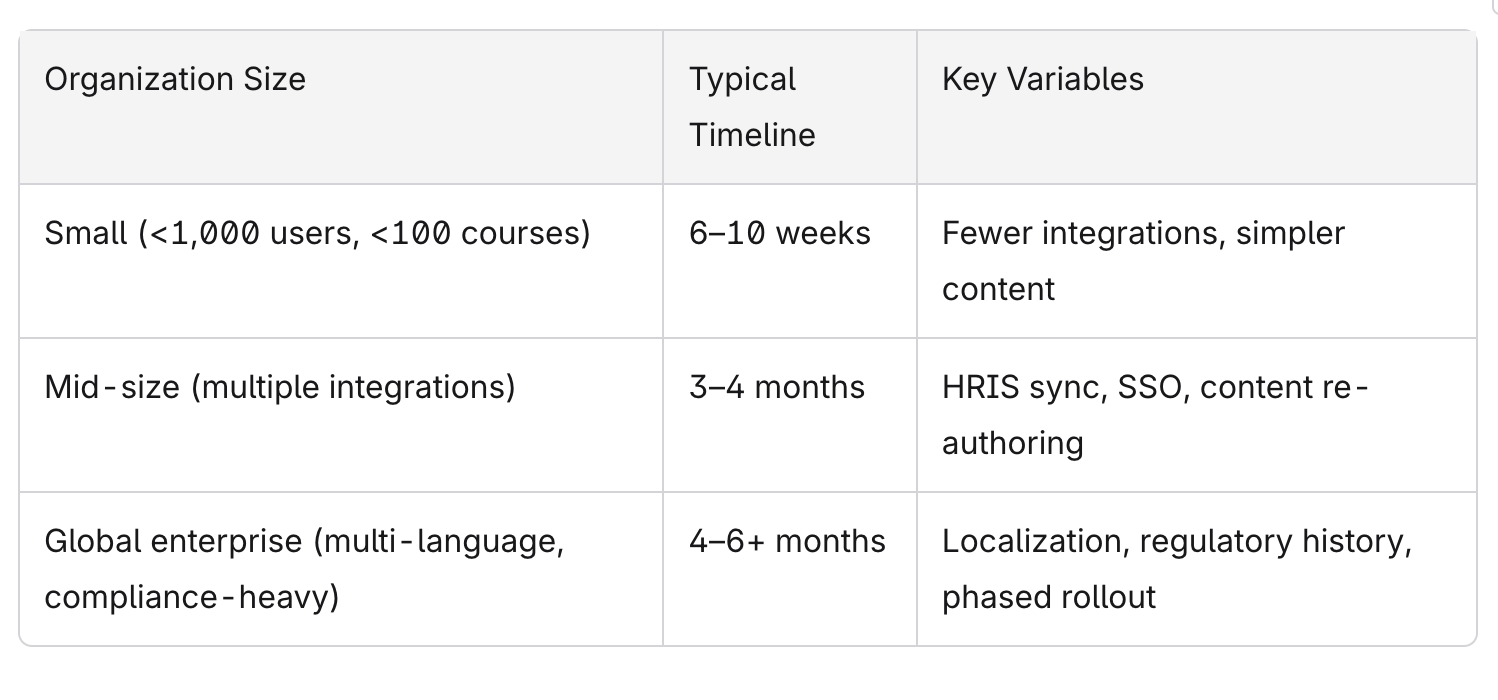
LMS migration can take 3 to 6 months for large organizations, sometimes longer when extensive content libraries or heavy compliance requirements are involved.
Primary cost drivers:
Number of courses and content complexity
Degree of content re-authoring vs. straight import
Number of integrations to rebuild
Whether internal teams or external migration services handle the work
Total conversion service costs typically range from $5,000 to $50,000 depending on project size
Key metrics to define before kickoff:
Zero critical data defects post-go-live
95–100% of in-scope users able to log in on day one with minimal disruption
No missed regulatory reporting deadlines
Stable training completion rates within 60–90 days
PowerDMS saved $150,000 in training costs with their new lms, while longer-term ROI includes reduced admin hours per month, fewer manual data exports, faster time to assign mandatory employee training, and improved learning analytics adoption across HR and business leaders.
Post-migration support includes troubleshooting and performance monitoring for new integrations - track support ticket volume in the first 4–6 weeks to identify configuration gaps quickly.
Selecting the Right Partner for Learning Management System Migration
Most organizations migrate lms platforms only once every several years, so choosing the right lms provider or migration partner is critical. Selecting the right LMS migration service involves ensuring data integrity and minimizing disruption throughout the implementation process.
Criteria to evaluate migration services providers:
Number of migrations completed since 2020
Familiarity with both your current lms provider and target lms platform
References and case studies in your industry
Ability to handle both data migration and integration work across your tech stack
What to look for in proposals:
Detailed migration runbooks and sample data mapping templates
Clear SOWs spelling out what is in scope and out of scope
Evaluating a vendor should include assessing their experience with specific integration needs - HRIS, CRM, SSO, and content marketplaces
Questions to ask your potential new lms vendor or migration partner:
"How do you validate reporting continuity after cut-over?"
"What is your approach to delta migration?"
"Can you support both HRIS and CRM integrations?"
"How do you handle rollbacks if critical issues are found?"
"What does post migration support include in the first 90 days?"
Prefer providers who involve migration specialists and solution architects early in pre-sales conversations rather than only after contracts are signed. A smooth transition depends on expertise showing up before, not after, the deal closes.
Next Steps: Planning Your LMS Migration Assessment

A structured assessment is the safest first step for any organization planning an lms transition within the next 6–18 months. An LMS migration assessment typically covers:
Current lms system review and gap analysis
Data and content inventory with migration scope recommendations
Integration map across your existing tech stack
Risk register with mitigation strategies
High-level migration plan with options (phased vs. big-bang, minimal vs. extended history)
Before the assessment, gather a small internal working group - L&D, HRIS/IT, and a key business stakeholder - so decisions can move quickly. Bring the following to the discussion:
Current lms vendor and version
Approximate user count and number of active courses
Key compliance and employee training programs
Hard deadlines (contract end dates, audit cycles, or learning initiatives launching in 2025–2026)
The difference between a successful lms migration and a costly failure almost always comes down to planning, scoping, and the right expertise. Whether you are consolidating one lms or moving from one learning management system to an entirely new training platform, a migration assessment gives you a tailored roadmap, risk profile, and budget range before you commit.
Request an LMS migration assessment - it is the most practical way to understand your options, align your learning strategy with your strategic objectives, and ensure your migration project delivers a better learning environment from day one.
